
TL;DR
- Transcription is three steps, each with its own model: speech recognition, word-level time alignment, and diarization. The third step is often not needed.
- Almost every PyTorch model has a “fast twin” on ONNX or CTranslate2: the same weights, several times faster.
- One NVIDIA L4 transcribes audio 70–90 times faster than real time. In October 24 of these GPUs transcribed over 1 million hours of audio at about $0.013 per hour — 15 times cheaper than Rev.ai’s public pricing.
Why we did this in the first place
Podscribe processes a stream of new podcast episodes: it finds the ads in them and measures what they deliver to advertisers. Everything starts with text: until an episode becomes a transcript with timestamps and speakers, there is nothing to search. For a long time we bought that text from Rev.ai.
At the same time, the quality of the open Whisper model is good enough for our tasks. That raises a natural question: how much would it cost to do transcription ourselves?
We ran the first prototype in August 2026, right on a MacBook. Whisper large-v3-turbo transcribed a 15-minute episode in 43 seconds. But pyannote, which figures out who is speaking, spent almost 10 minutes on the same episode. So the key takeaway from day one is recognizing speech is easy; knowing who is speaking is expensive and more time consuming.
Today we have our own GPU pipeline built entirely on open models. In October 2026 alone, it processed over 1 million hours of audio: radio broadcasts, video versions of podcasts on YouTube and Rumble, and clips from social networks.
Anatomy of transcription in three steps
When people say “transcription,” they usually picture a single model: audio in, text out. In reality, a transcript with timestamps and speakers needs three different models, and each one can be chosen and swapped independently.
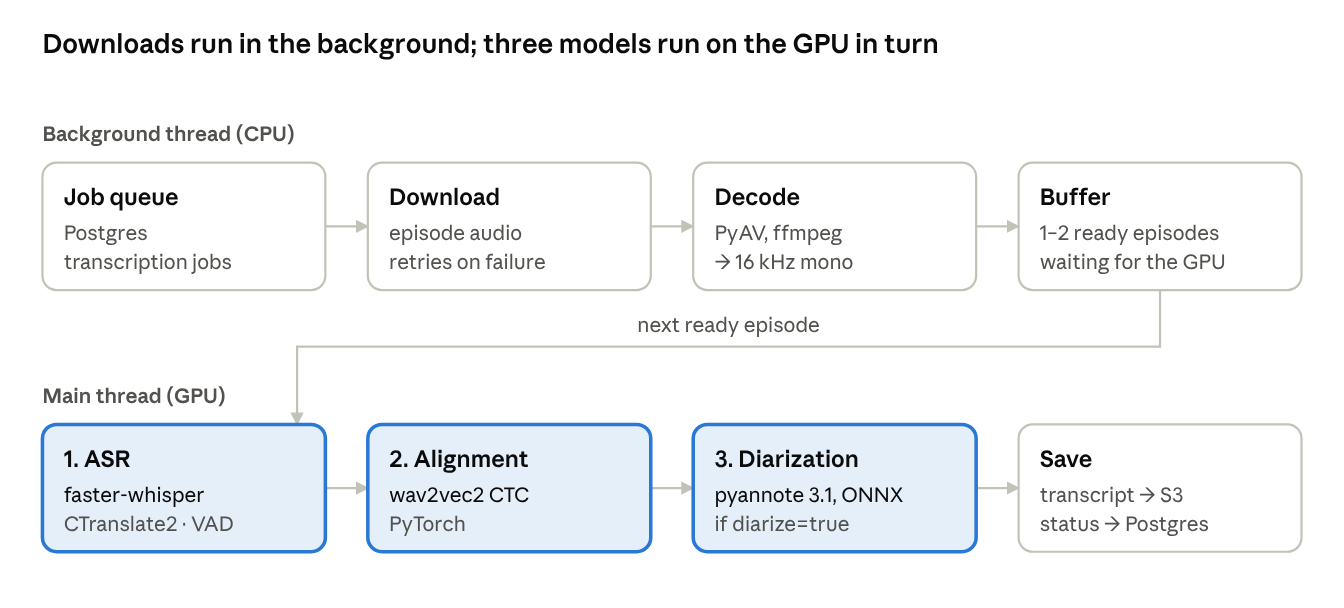
Podscribe transcription pipeline · background and GPU threads
The work is split into two threads. The background thread takes jobs from the queue, downloads and decodes the audio, and puts ready episodes into a small buffer. The main thread takes an episode from the buffer, runs it through the three models strictly in turn, and saves the transcript. This way the GPU doesn’t sit idle while the next file is downloading.
1. Automatic Speech Recognition (ASR): what was said
The speech recognition model turns audio into text. It is preceded by VAD (voice activity detection), a tiny network that cuts out silence and music. Without it, Whisper wastes time on jingles and likes to “hear” words in the pauses. The output is text split into segments a few seconds long, plus the episode’s language.
Podscribe uses faster-whisper with the large-v3-turbo model. Its quality is good enough for our tasks, and it is multilingual with a mature ecosystem.
2. Alignment: when it was said
Whisper knows what was said, but its timestamps drift by seconds. That’s not enough for finding ads: we need to know exactly where an integration starts and ends. So the second model, wav2vec2 with a CTC head, lays the already known text back onto the audio and finds the exact time of every word. This is called forced alignment.
Podscribe uses easyaligner with a separate wav2vec2 model for each of 17 languages.
3. Diarization: who said it
Diarization doesn’t look at the text. It cuts the audio into windows, computes a “voiceprint” (embedding) for each window, and groups the voiceprints by speaker. This is the heaviest and most temperamental part of the pipeline — the one that took 10 minutes in our first prototype. Once alignment and diarization are both complete, each word from the alignment gets a speaker by interval overlap, and postprocessing makes sure one sentence belongs to one person.
Podscribe uses pyannote speaker-diarization-3.1: segmentation, WeSpeaker ResNet34 embeddings, and agglomerative clustering, all on ONNX Runtime.
Why we need to know who is speaking
In ad analysis, diarization solves one task: distinguishing a host-read ad from a producer-read ad. A host-read is when the show’s host reads the scripted ad. A producer-read is when someone other than the podcast show host reads the ad, such as a producer or an announcer. A language model makes an initial guess based on the ad’s wording. For example, an ad written in the first person and tailored to the show is more likely to be read by the host. We then use diarization to check who actually read it.
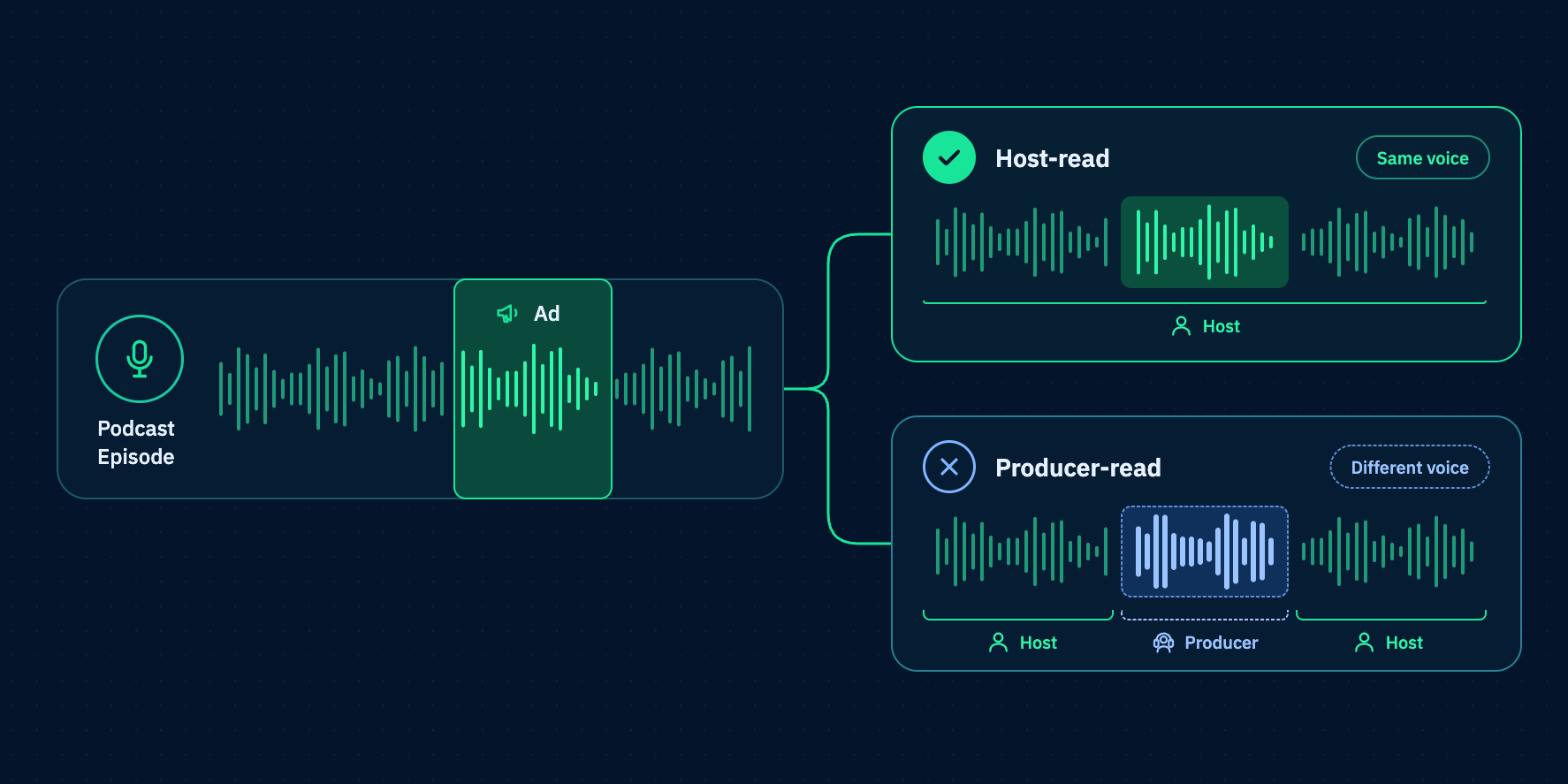
Hosts are the speakers who account for more than 10% of the episode’s words aside fromads. Then we check who’s speaking at the midpoint of the ad: if it’s a host, the ad is a host-read; if it’s someone else, it’s a producer read.
We use diarization only when identifying the speaker helps classify an ad. We skip it for single-speaker clips and recordings with too many voices to separate reliably, saving GPU time. In practice, diarization runs on about 19% of the audio hours transcribed through our own service. Speaker labels also appear in transcripts in the app and are available through the API.
From prototype to production in two months
We built the pipeline from August through the end of September. By October 2026, it was running reliably in production.
The main trick: a PyTorch model almost always has a fast twin
If you remember one thing from this article, let it be this: before optimizing a model, look for its accelerated version. For every PyTorch model in our pipeline we found one ready-made — the same weights, moved to ONNX or to a specialized engine like CTranslate2.
Why does this work?
PyTorch is built for training: it runs operations one at a time, from Python, and drags gigabytes of CUDA dependencies along. ONNX is a frozen computation graph. ONNX Runtime sees it whole: it fuses neighboring operations, precomputes constants, supports fp16 and int8, and runs the same file on CUDA, TensorRT, CPU, or Apple CoreML. CTranslate2, which faster-whisper is built on, does the same specifically for transformers and adds batched decoding.
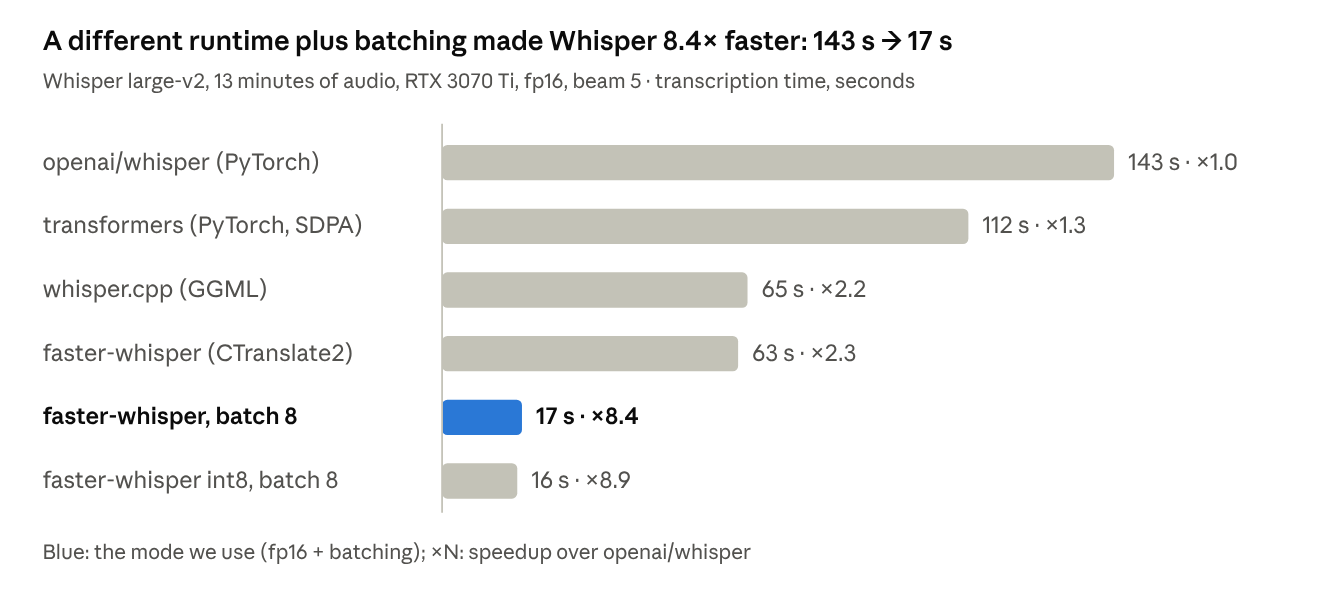
faster-whisper 1.2.1 README · 13 minutes of audio, NVIDIA RTX 3070 Ti, CUDA 12.4
This is the benchmark from the faster-whisper README: the same Whisper on the same GPU. Switching the runtime gives ×2.3, and adding batching gives ×8.4. The model weights didn’t change by a single bit.
Pitfalls we ran into
- Silent CPU fallback. ONNX Runtime 1.22 with CUDA needs libcudart and cuDNN 9. Without them, the session is happily created on the CPU — with no error. Now we log the requested and actual providers and build the image from nvidia/cuda:12.6.3-cudnn-runtime.
- Dependency hell. faster-whisper pulls in the CPU build of onnxruntime, which has the same module name as onnxruntime-gpu, so we remove it in the Dockerfile. And torch is pinned to <2.9: newer wheels bring CUDA 13 and break ORT.
- A graph is not a pipeline. Only the neural networks move to ONNX. We had to port pyannote’s windowing and clustering to numpy and scikit-learn — about 300 lines based on the MIT-licensed pyannote-onnx-extended project.
- Checking against a reference. Before switching, we compared the output with WhisperX results on the same episodes. If there is no ready-made ONNX, the model is exported via torch.onnx.export or Optimum — and then this check is mandatory.
How we evaluated quality
The standard speech recognition metric, WER (word error rate), answers our question poorly. We prioritize whether every preposition was heard correctly. We care whether the transcript lets us find the same ads a human would. So we evaluated models by business outcome on a pre-labeled basket of episodes:
- The basket. We put together a set of episodes in which every ad was labeled in advance.
- The whole pipeline. We ran each candidate from transcription all the way to ad detection and compared not the texts but what gets extracted from them.
- Three metrics against the labels:
- 1. ad count — how many integrations were found and how many were missed;
- 2. links — whether the addresses read out in the ads (like brand.com/podcast) were found;
- 3. promo codes — whether they were recognized letter for letter. This is the strictest test for ASR: promo codes are made of rare words, names, and digits, and a single wrong letter makes them useless.
- One basket for everyone. We compared models, settings, and external APIs on the same basket, so decisions were made by the numbers, not by gut feeling.
Labeling the basket takes manual work, but it only has to be done once: after that, any change to the pipeline can be checked against it.
So what’s the performance?
Let’s start with speed — everything else follows from it. We measure it in “× real time”: how many times faster than the audio itself lasts.
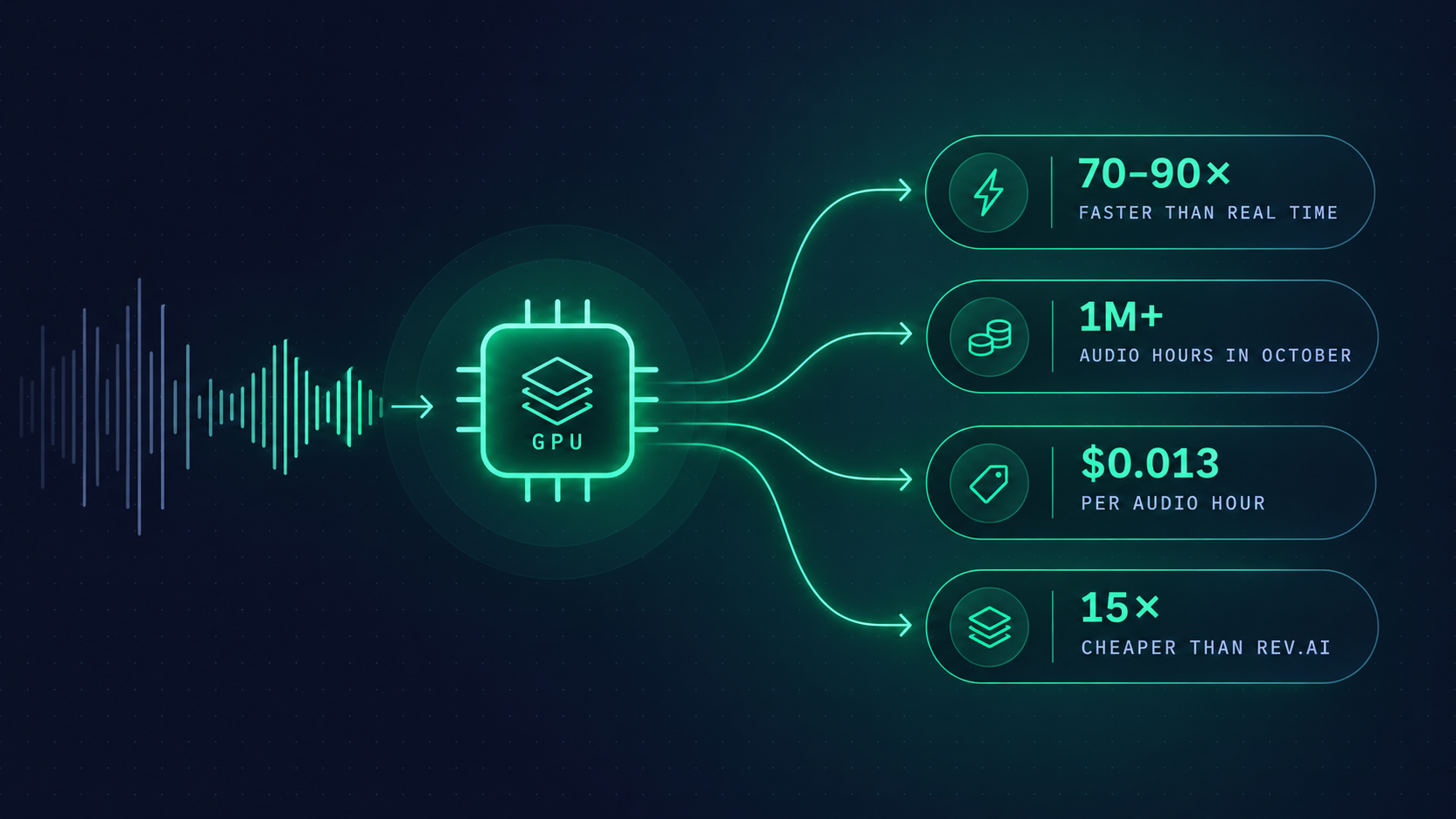
- Up to 90× per instance on radio broadcasts: two-hour recordings without diarization. Two hours of broadcast are transcribed in about 80 seconds.
- About 70× on the real basket, where everything is mixed: long and short episodes, with diarization where it’s needed.
At 70×, one L4 processes about 1,700 hours of audio per day, and a fleet of 24 about 1,250,000 hours in 31 days. In October, it processed over 1 million hours, which means it was about 86% loaded.
Comparing costs
In October, 2 GPUs transcribed over 1 million hours of audio. Running them all month at $0.8048 per instance-hour cost about $14.4K, or $0.013 per audio hour, including idle time.
Here’s how that compares with public API prices for recorded audio. Monthly estimates use the same 1,077,000 audio hours; rates were checked on November 2, 2026.
| Service | Price per audio hour | Cost for the same monthly volume |
|---|---|---|
| Our pipeline | ≈$0.013 | ≈$14.4K |
| Rev.ai Reverb, English | $0.20 | $215.4K |
| Rev.ai Reverb, other languages | $0.30 | $323.1K |
| Deepgram Nova-3, monolingual | $0.258 | $277.9K |
| Deepgram Nova-3, multilingual | $0.312 | $336.0K |
| ElevenLabs Scribe v2 | $0.22 | $236.9K |
Rev.ai and Deepgram figures are pay-as-you-go list prices; volume agreements can lower them. Deepgram includes diarization for recorded audio. ElevenLabs’ rate excludes optional keyterm prompting and transcript editing. Our figure covers GPU instances, excluding engineering and other infrastructure costs.
Choose for your task, not just the price
Rev.ai, Deepgram, and ElevenLabs offer more than transcription. Depending on the provider, extras include real-time streaming, summaries, sensitive-data redaction, custom vocabulary, and human transcription. They also handle the infrastructure and offer support. Those capabilities can justify the price if your product needs them.
For a large backlog that needs to be transcribed quickly, a managed provider is often the better choice. Providers can spread work across large GPU fleets and use spare capacity to absorb bursts, without you provisioning extra machines. Check concurrency limits and available capacity with the provider before a large run.
Start with what you actually need. For our pipeline, the core requirement is accurate text with word timestamps and speaker labels where needed; ad analysis happens in our own systems. Open-source models cover that well. If your needs are similar and you can operate the pipeline, open source is a practical choice. Compare quality on your own audio, check which extras matter, and include engineering time in the cost.
Our steady stream of audio lets us keep the GPUs busy. Batched inference, background downloads, and running diarization only where needed help us use GPU time more efficiently and reduce the cost per audio hour.
Conclusion: open source can and should go to production
In August, our own transcription pipeline looked like a bold experiment on a MacBook. By the end of September it was ready for production, and in October it was running reliably on 24 GPUs that handle everything except the main podcast feeds, plus a Grafana dashboard.
It can — because open models already top the Open ASR Leaderboard, the tools install with pip, and acceleration through ONNX and CTranslate2 is almost free. Whisper’s quality is good enough for our tasks.
It should — because our own pipeline is 15 times cheaper and gives you what you can’t buy through an API:
- Quality tuned to the task. We choose the model for each step and language, the beam size, the chunking for alignment, and where to turn on diarization.
- Freedom from the vendor. API prices and models change without asking us. Our own pipeline is both a fallback and a strong argument in negotiations.
- Data stays at home. Audio and transcripts don’t go to a third party.
- Transparency. Queue priorities, limits, metrics for every step and instance. We can see why a specific episode failed instead of getting an abstract 500.
- Free upgrades. Every new open model — Parakeet, Granite, pyannote community-1 — plugs in by swapping a single step.
This has its own cost: engineering time, on-call duty, and the eternal war of CUDA, torch, and ONNX Runtime versions. But judging by the repository history, the hardest part is behind us: since late September the work has been ordinary operations.
Please note: All the numbers in this article use the on-demand price — $0.8048 per GPU hour. Next we’re moving to pre-paid: paying for instances in advance to lower the price of a GPU hour, and with it the cost of an audio hour. So “15 times cheaper” is more of a lower bound on our savings. Before switching to pre-paid, we’ll test the g7 instance family. But it’s not a given that they’ll be cheaper for us: our pipeline uses little video memory, and transcription in general is far less demanding than LLMs.